Otto.CARE
Product demoJoin the waitlist
A voice-first assistant for aging parents

She doesn't learn the app.
She just talks.

Otto is a companion for parents in their 80s who find modern apps impossible — built by their family, with their family in the loop. One big button. One thing on screen at a time. Every screen below is the real product, captured from a live session.

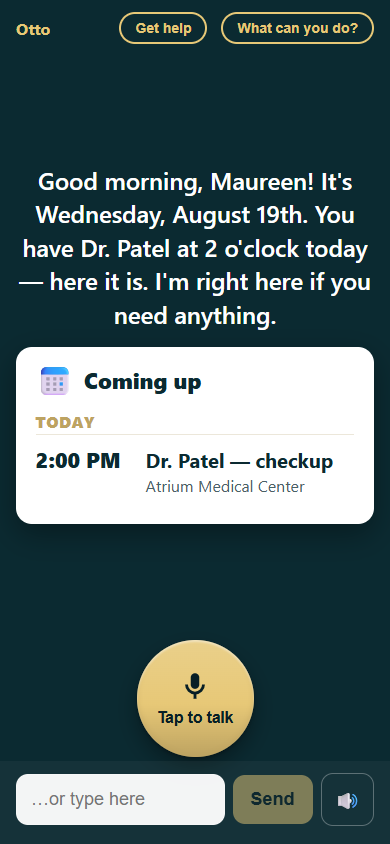
Otto's parent screen greeting Maureen good morning, with a Coming up card showing Dr. Patel at 2:00 PM and a large gold Tap to talk button
Opening Otto: a spoken good morning, today's appointment already on screen.
The launch point

“What can you do?”

No menus, no settings pages. A parent taps one chip — or simply asks — and Otto shows everything it can do for them. The list is composed live from what's actually connected, so Otto never advertises something that would fail. Every row is tappable and immediately does the thing.

Tap any row below to jump to that part of the demo — the same way the real card launches each feature.

The full 'Here's what I can do' card: nineteen tappable gold rows grouped under Every day, Getting around, Groceries, Your calendar and email, and For fun — the last one reads Find music and shows to watch
The real card — scroll it. It's built server-side from ground truth: which accounts are connected, what's in her profile, which services are configured. The AI can neither add nor remove a row, so the card is always honest.
The tour

One ask, one answer, one card

Every flow works the same way: she says it (or taps it), Otto speaks one warm sentence, and a single large card shows the answer. Nothing to navigate, nothing to dismiss.

Every day
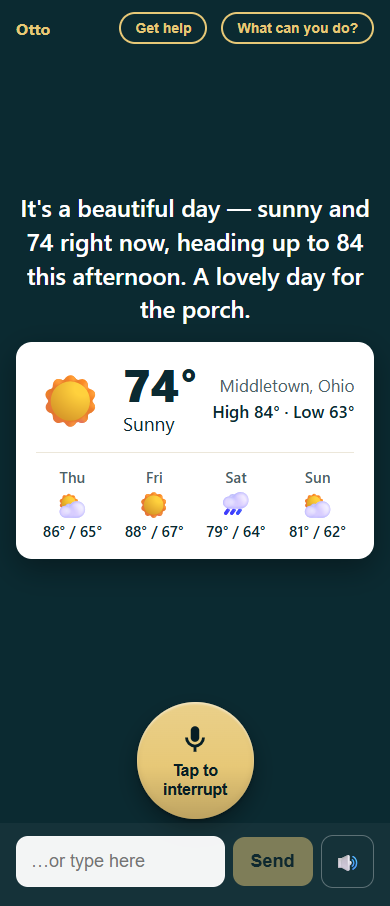
Weather card for Middletown, Ohio: sunny, 74 degrees, high 84 low 63, with a four-day forecast

The weather, for her porch

Maureen “What's the weather like today?”

Otto answers out loud in plain language — “a lovely day for the porch” — and shows today plus the next few days in big type. Location comes from her profile, so the default ask always means her weather.

  • Look things up works the same way — “What is there to do in Gatlinburg?” gets a spoken answer grounded in a real web search.
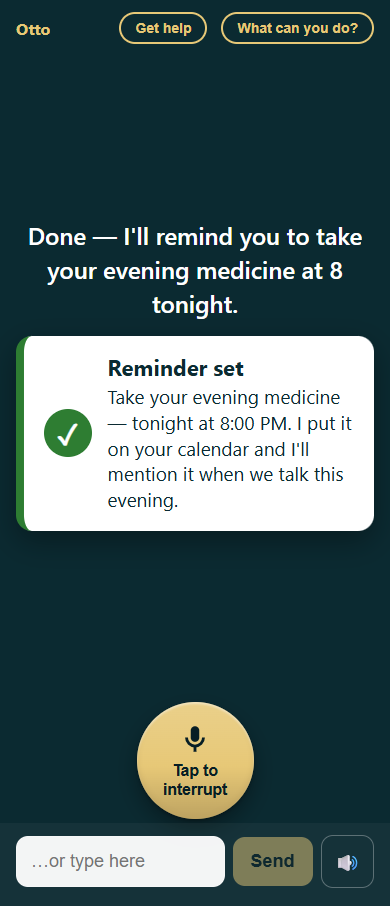
Reminder confirmation card: evening medicine tonight at 8, added to the calendar

Reminders that live on the family calendar

Maureen “Remind me to take my medicine at 8 tonight.”

Reminders are real calendar events — not another app's notification queue. Otto confirms in one card, and mentions it again in the greeting when the time is near.

  • The family calendar is shared, so Mike sees the same reminder from his side.
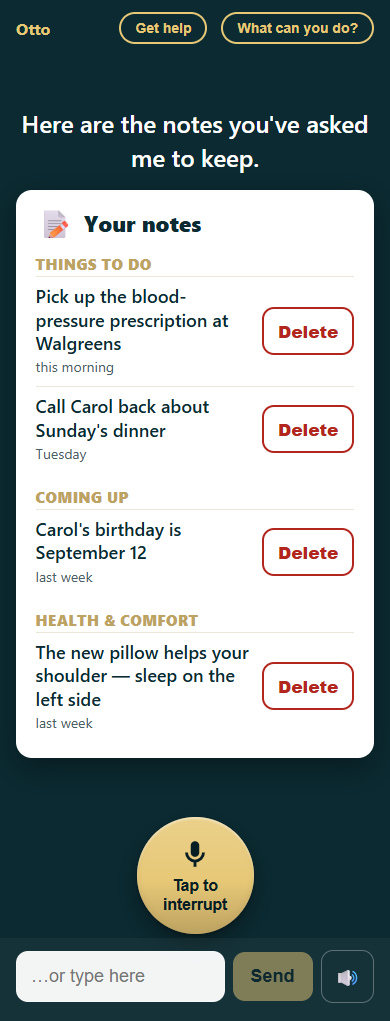
Notes card grouped into Things to do, Coming up, and Health and comfort, each note stamped with when it was said

A memory supplement, not a filing cabinet

Maureen “What are my notes?”

“Help me remember…” saves a note in her own words. Notes come back grouped in plain language — things to do, coming up, health & comfort — each stamped with when she said it.

  • A hard privacy guard refuses to store card numbers, passwords, or PINs — enforced in code, not just by the AI.
  • Deleting is two taps on the card, or just asking — and Otto always confirms the exact note first.
Getting around
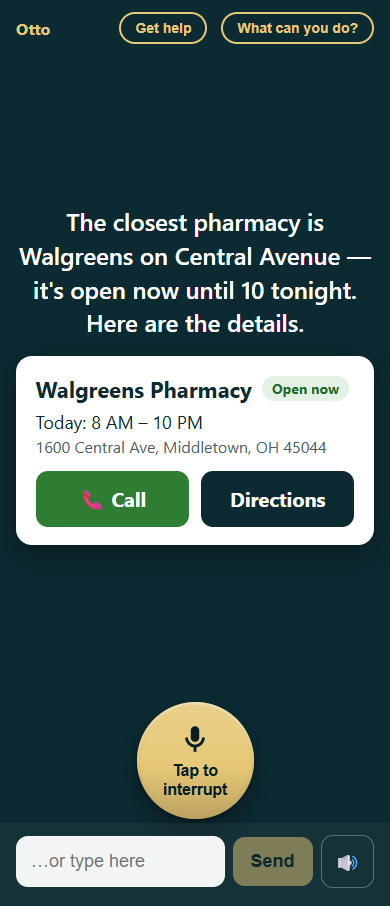
Place card for Walgreens Pharmacy on Central Avenue: address, phone, open now until 10 PM

Find a place without a map fight

Maureen “Where is the nearest pharmacy?”

Address, phone, and whether it's open right now — the three things she actually needs — with a map a tap away. “How far is the library from home?” answers with distance and drive time from her real home address.

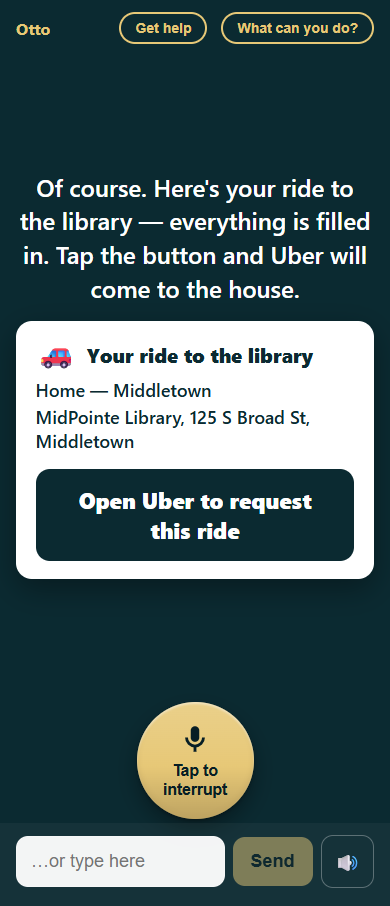
Ride card from home to MidPointe Library with a large Open Uber to request this ride button

A ride, ready to tap

Maureen “Can you help me get a ride somewhere?”

Otto fills in pickup and destination and hands over a ready-made Uber link — to her, or to Mike, whichever the family chose during setup. Nobody types an address into a ride app.

  • A safety guard watches every ride: an unusually distant destination or an odd-hours request quietly alerts the family first.
Groceries

Groceries: see it, tap it, sent

Maureen “I need milk.”

Mom once built an entire Kroger cart and couldn't check out — that moment is why Otto exists. Now the whole trip is three taps, with her usual brands starred and pinned first.

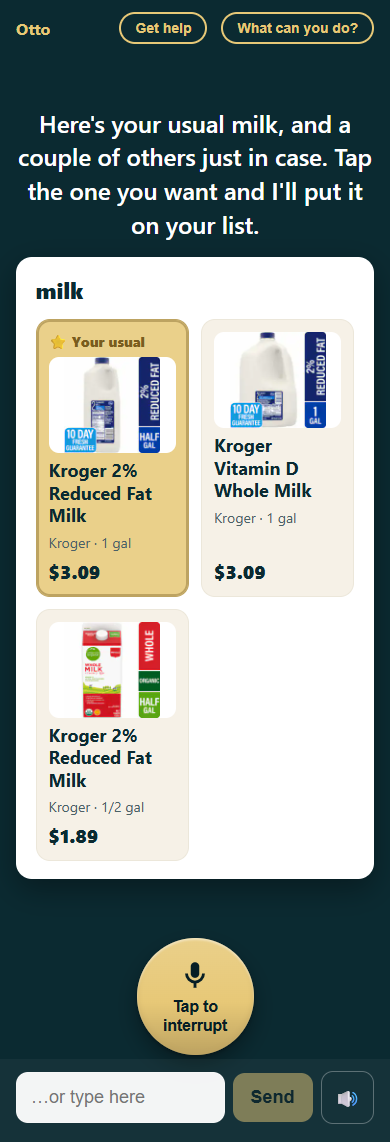
1 Choose
Grocery choice card for milk: 'Your usual' Kroger 2% gallon starred and pinned first with photo and price, plus whole milk and a half gallon

Her usual milk comes first — real photos, real prices from her own Kroger store. Tap one and it goes on the list.

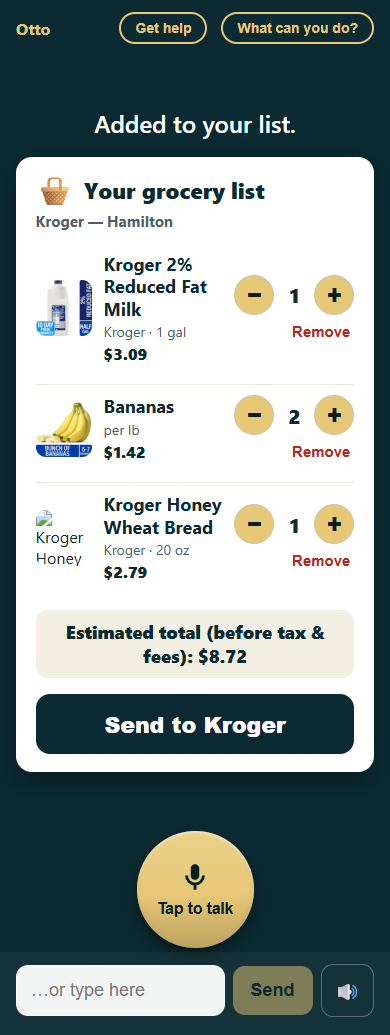
2 Review
Grocery list review card: milk, bananas, and bread with quantity controls, an estimated total of $8.72, and a Send to Kroger button

The list stays editable — quantities, removals, a running estimate — before anything is sent anywhere.

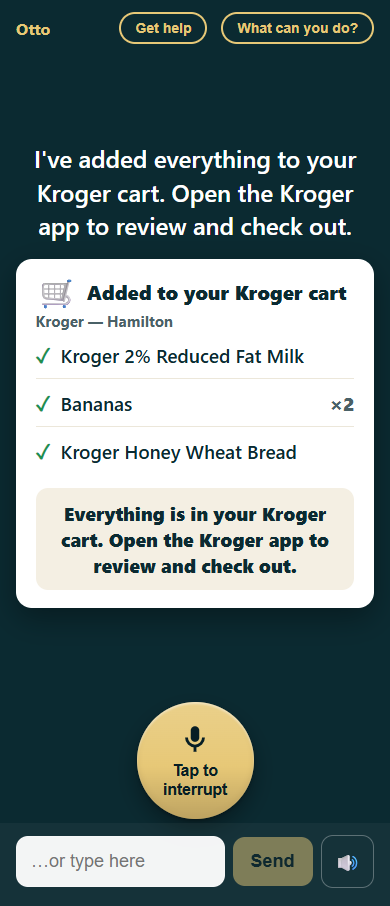
3 Send
Confirmation that everything was added to the real Kroger cart, with a note to open the Kroger app to check out

One tap pushes everything into her real Kroger cart. Otto never places the order — checkout stays in her hands (or Mike's).

Cooking together

Cooking, one spoken step at a time

Maureen “Can you help me cook something?”

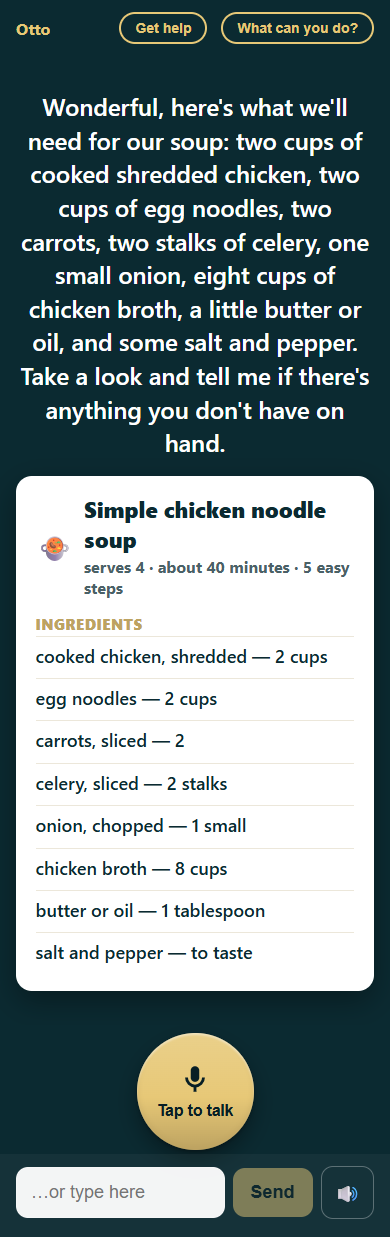
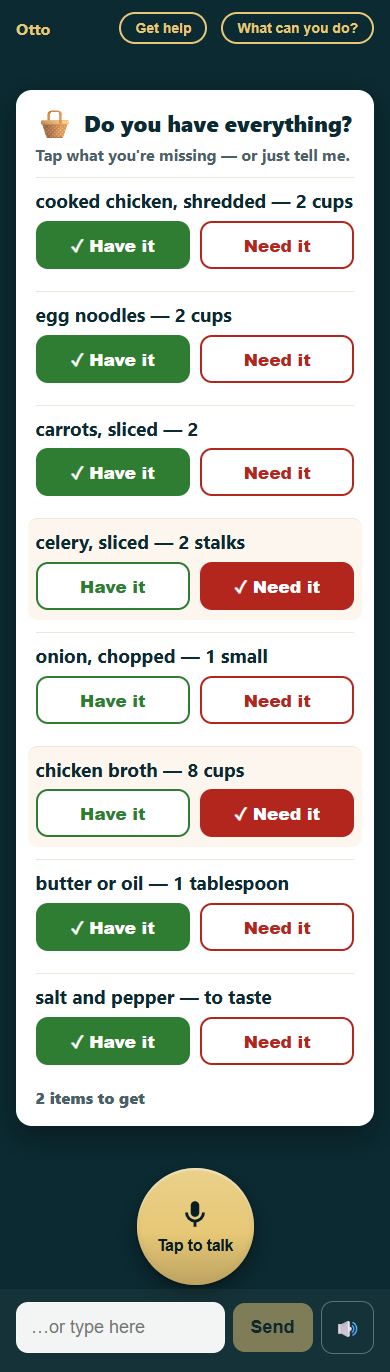
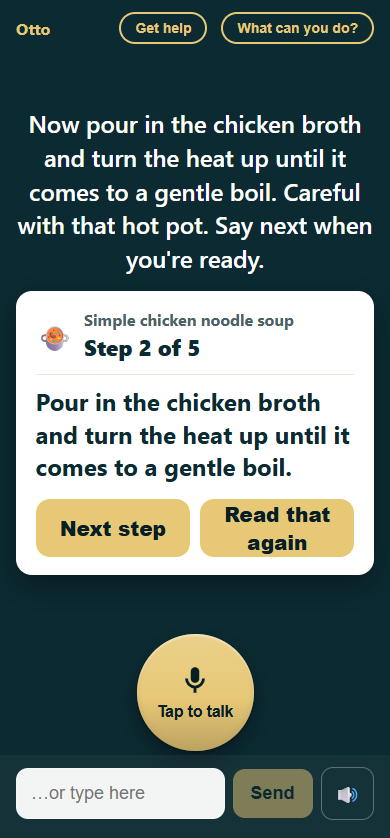
Otto plans a simple version of the dish, checks the ingredients before anything touches the stove, then walks the recipe out loud — one step on screen at a time, at her pace.

1 Plan
Recipe card for simple chicken noodle soup: serves 4, about 40 minutes, 5 easy steps, with the full ingredient list, after Maureen asked Otto to help her cook

A simple recipe, spoken and shown — servings, time, and every ingredient in big type before anything starts.

2 Check
Do-you-have-everything checklist: chicken, noodles, carrots, butter, and salt marked Have it in green; celery and chicken broth marked Need it in red; onion not checked yet; footer reads 2 items to get

She taps Have it or Need it — or just says it. Anything missing becomes a shopping list, and with Kroger connected Otto offers to add it to her cart.

3 Cook
Cooking step card for simple chicken noodle soup, step 2 of 5 — pour in the chicken broth and bring to a gentle boil — with Next step and Read that again buttons

One step at a time, spoken and shown, until the pot's on the table. “Say next when you're ready” — Otto never rushes ahead.

  • The last step is always the same: make sure the stove and oven are off — written into every recipe by the product, not the AI.
  • Honest about time: when a step needs 20 minutes, Otto says so and points to her own kitchen timer — it never pretends it can watch the clock for her.
  • Wandered off for a few days? Otto keeps her place, and the next hello offers to pick the meal back up.
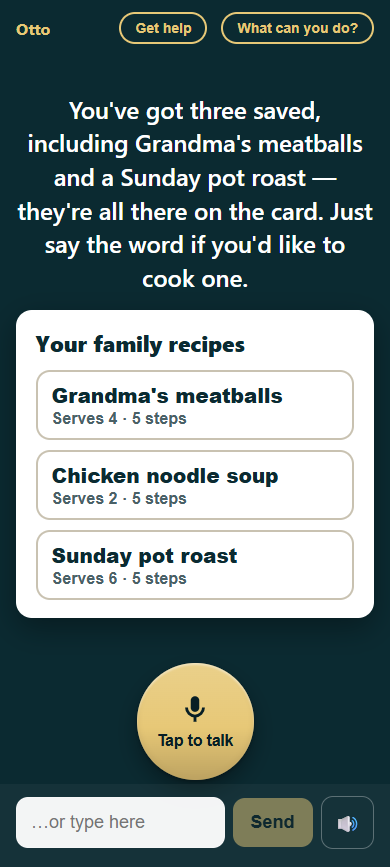
Your family recipes card listing Grandma's meatballs, chicken noodle soup, and Sunday pot roast, each with servings and step count

The family recipe book

Maureen “What are my saved family recipes?”

A dish she liked gets saved in one word — and the family can type in the old favorites from the console. Type in Grandma's meatballs once; from then on she just asks for them, and Otto cooks it with her exactly as written.

  • Saved recipes come back verbatim — Otto never rewrites a family recipe on recall.
  • Tapping a recipe on the card starts the meal, the same ingredient check and all.
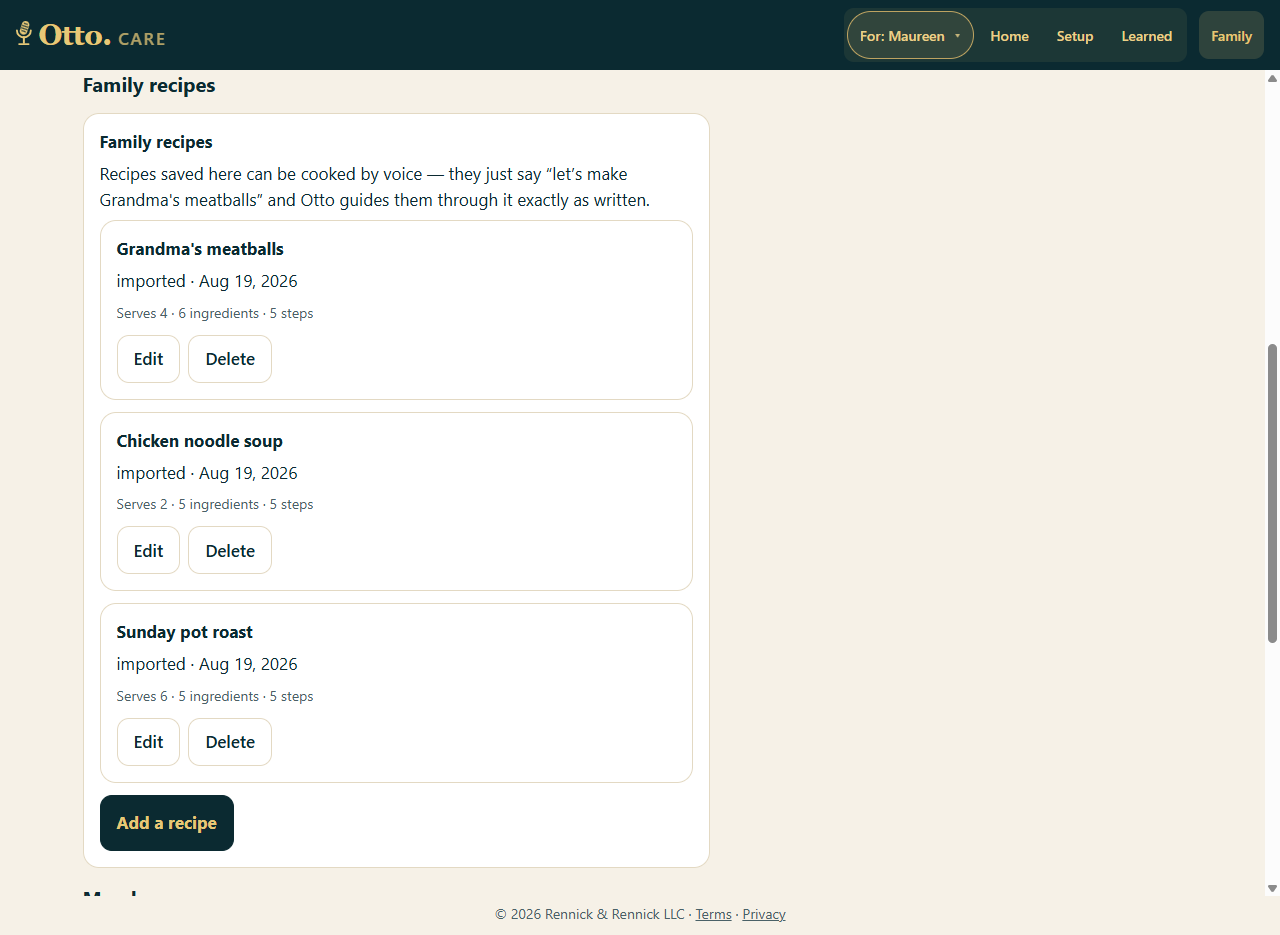
Otto.CARE Family recipes panel listing Grandma's meatballs, chicken noodle soup, and Sunday pot roast with Edit and Delete buttons and an Add a recipe button
The family side: Mike types a beloved recipe into the console once — Otto guides it exactly as written, every time she asks.
Your calendar & email
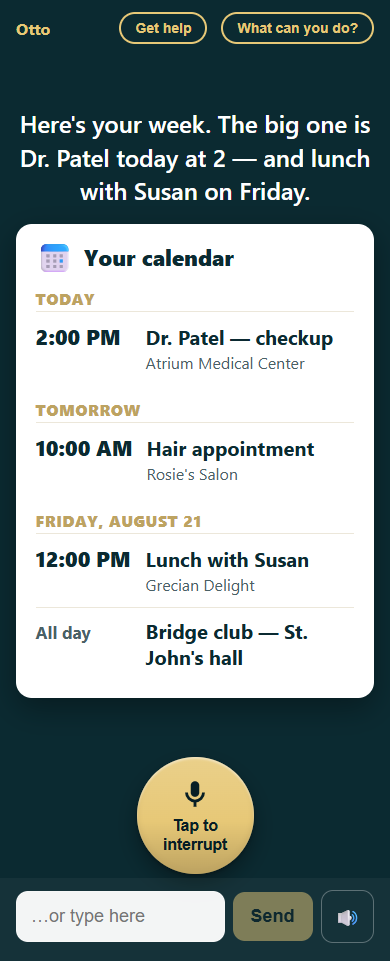
Calendar card grouped by day: Dr. Patel today at 2, hair appointment tomorrow, lunch with Susan and bridge club on Friday

The week, at a glance

Maureen “What's on my calendar this week?”

Day by day, in her time zone, from the family's shared Google Calendar. Adding is just as easy: “Put lunch with Susan on my calendar for Friday at noon.”

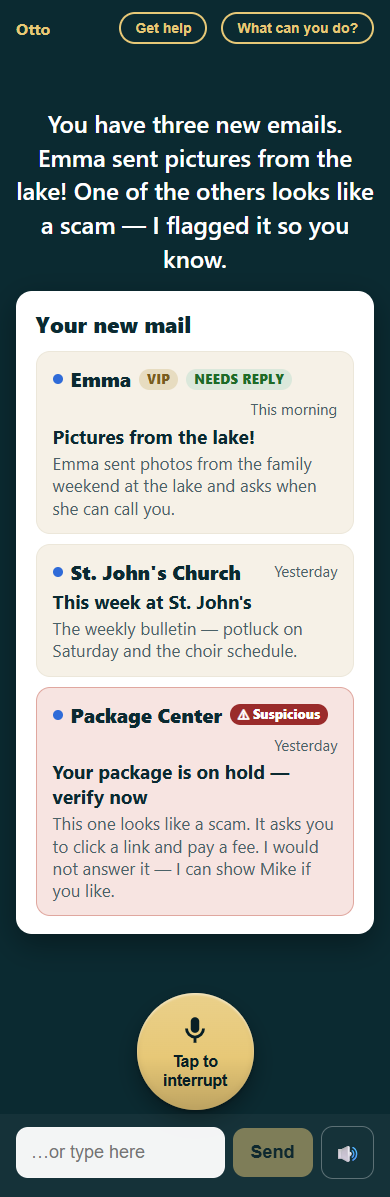
Email card: message from Emma marked VIP and Needs reply, the church bulletin, and a suspicious package message flagged with a red Suspicious badge

Email with a scam-watcher built in

Maureen “Do I have any new email?”

Family first: people she loves are VIPs and float to the top, with a gentle nudge when someone's waiting on a reply. And every message is screened — the fake “package on hold” gets a red flag and a plain-language warning.

  • A scam warning always wins — even a VIP can't hide a suspicious message.
  • She can say “read it to me,” “find the email about my doctor,” or “help me write an email” — Otto drafts, reads it back, and sends only when she says so.
  • Her real inbox is untouched — Otto works from a private forwarded copy.
For fun
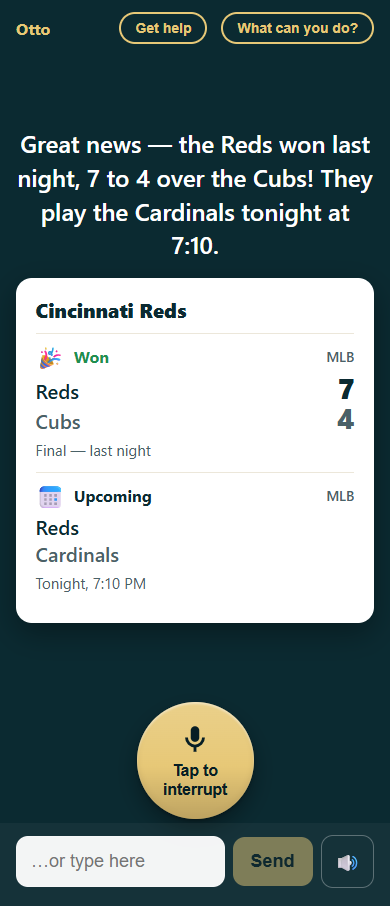
Sports card: Reds beat the Cubs 7 to 4, final; Reds play the Cardinals tonight at 7:10

How the Reds did

Maureen “How did the Reds do?”

Her teams live in her profile, so “my team” always means the Reds. Last night's score, tonight's game — and she can ask for the story of the game, not just the number.

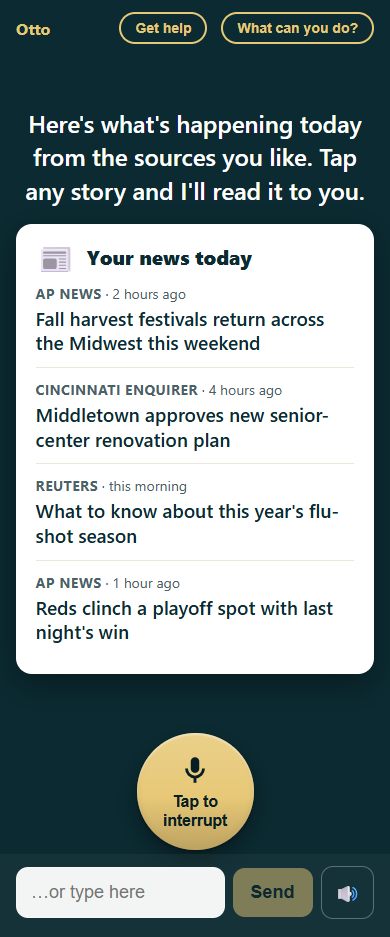
News card with four fresh stories from AP News, Cincinnati Enquirer, and Reuters, each stamped with how recent it is

News from sources her family trusts

Maureen “What's in the news today?”

The family picks the sources and topics — and what to leave out. Every story is fresh, stamped with how recent it is, and Otto will read any of them aloud.

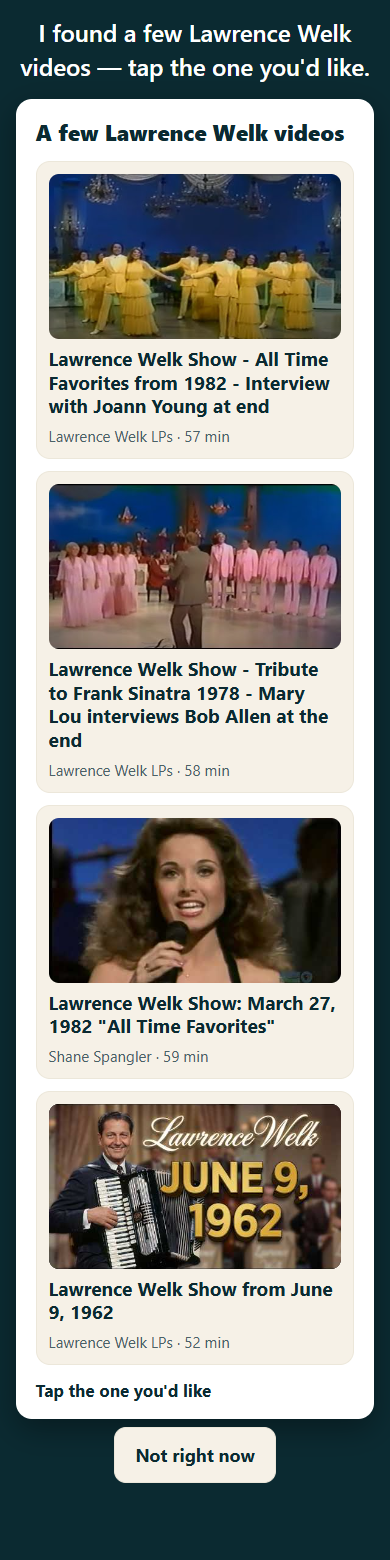
A few Lawrence Welk videos: four real YouTube results with thumbnails, full titles, channel and length — 57, 58, 59 and 52 minutes — under the line Tap the one you'd like

“Play me some Lawrence Welk”

Maureen “Play me some Lawrence Welk.”

Otto looks it up and shows real videos — never a made-up one — with a picture, the full title, and how long it runs. The family can save favorite channels ahead of time, so “Lawrence Welk” means the exact channel they chose, not whatever the internet offers today.

She taps the one she wants and it plays. One tap, sound on.

  • The choices stay on screen until she picks one — they don't vanish when Otto says something else.
  • If Otto can't search, it says so plainly and offers her favorites instead — it never pretends to be looking.
The video player card: the episode title, a still from the show with one large Play button, and two big buttons underneath reading Make it bigger and All done

Big, obvious, and easy to stop

Ask by voice instead of tapping — “play the first one” — and Otto has it ready and waiting, exactly as shown here, so one tap starts it. Either way there is only ever one play button and one way out.

One video at a time, in a card she can make full-screen with a tap — and stop with a tap.

While it plays, Otto goes quiet. It never talks over the show, and the microphone will not open by itself next to a television-sized sound — that is enforced in code, not left to chance. Tap the microphone and the video pauses first, so Otto hears her and not the soundtrack.

  • When the show ends, Otto takes the turn back — before YouTube can start suggesting things.
  • It plays in the real YouTube player, visibly. Nothing is downloaded, nothing is kept.
And it all happens in Otto's voice

Everything you've read above, Maureen hears. Each family member picks the voice Otto uses with them — six to choose from, previewed right in the family console. These are all six, for real:

The other half of Otto

The family is built into the product

Otto is never a dead end. Anything it can't do becomes a hand-off to a real person — and the family runs everything from their own console, Otto.CARE.

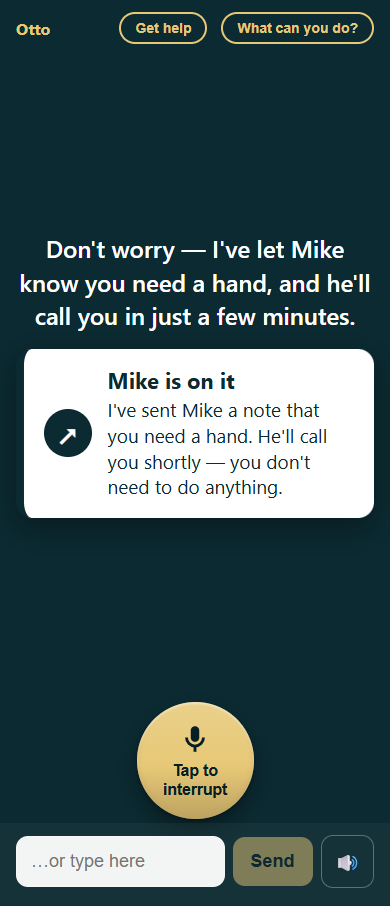
“Get help” — from her screen to Mike's, in one breath

Confirmation card titled 'Mike is on it' reassuring Maureen that Mike has been notified and will call shortly
Her side: one tap, one reassurance. Nothing else to do.
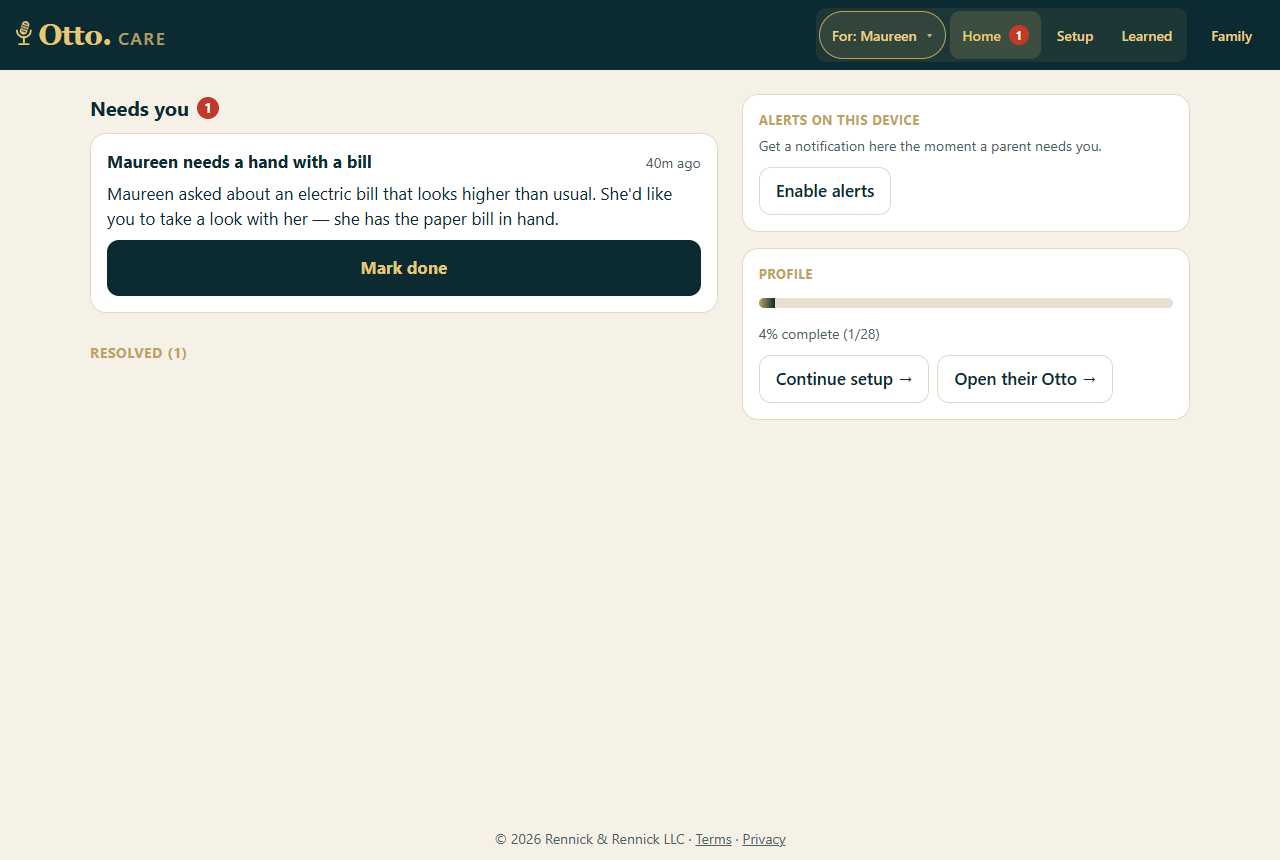
Otto.CARE family dashboard: a 'Needs you' item — Maureen needs a hand with a bill — with Mark done, device alerts, and profile progress
Mike's side: the ask lands in “Needs you” with a push notification — with the detail Otto gathered, and one button to mark it done.

Setup is a conversation, too

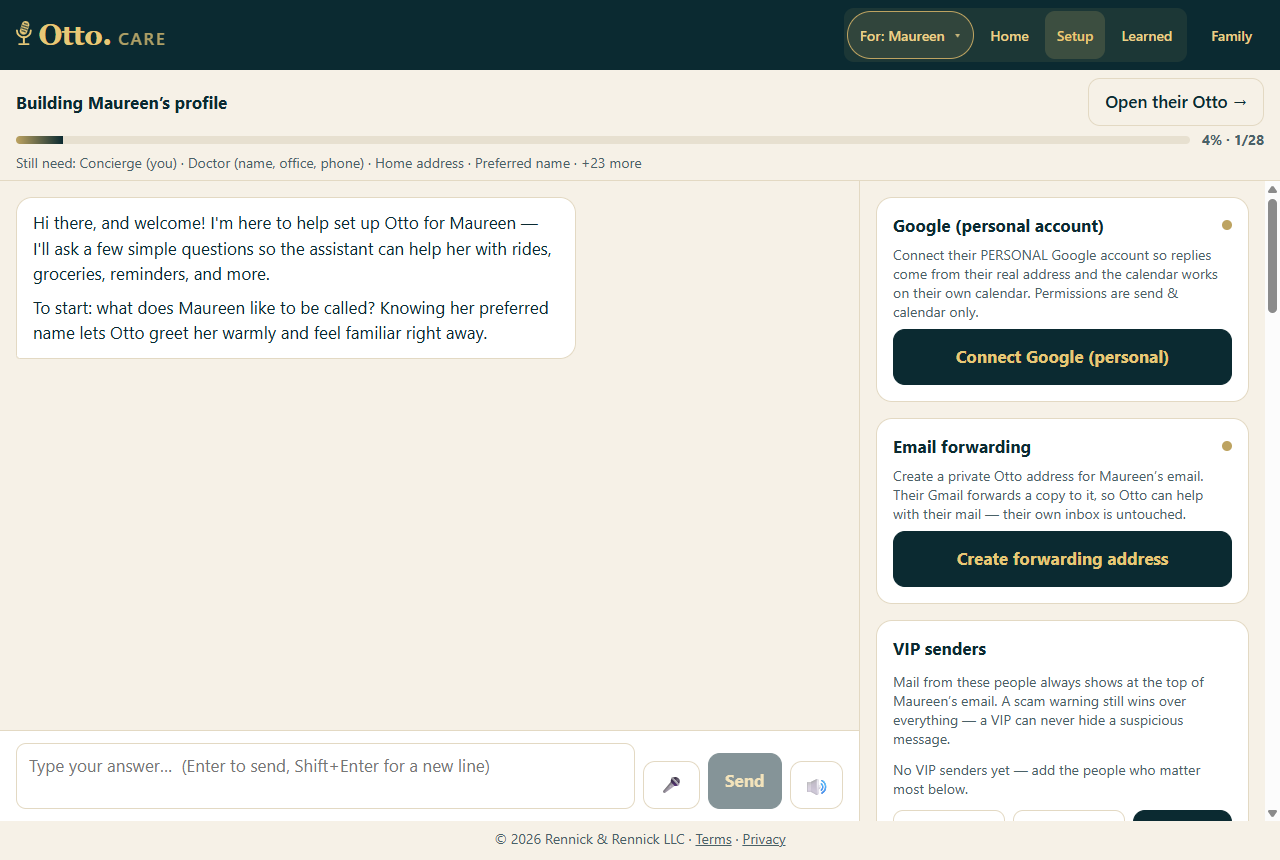
Otto.CARE setup for Maureen: interview assistant, completeness meter at 4%, and panels to connect Google, email forwarding, and VIP senders
A concierge interview builds the profile — doctor, home, favorite teams, news sources — while side panels connect Google, email forwarding, Kroger, and VIP senders. A completeness meter shows what's still missing, and “Open their Otto” previews exactly what the parent will see.

The family's controls, in plain words

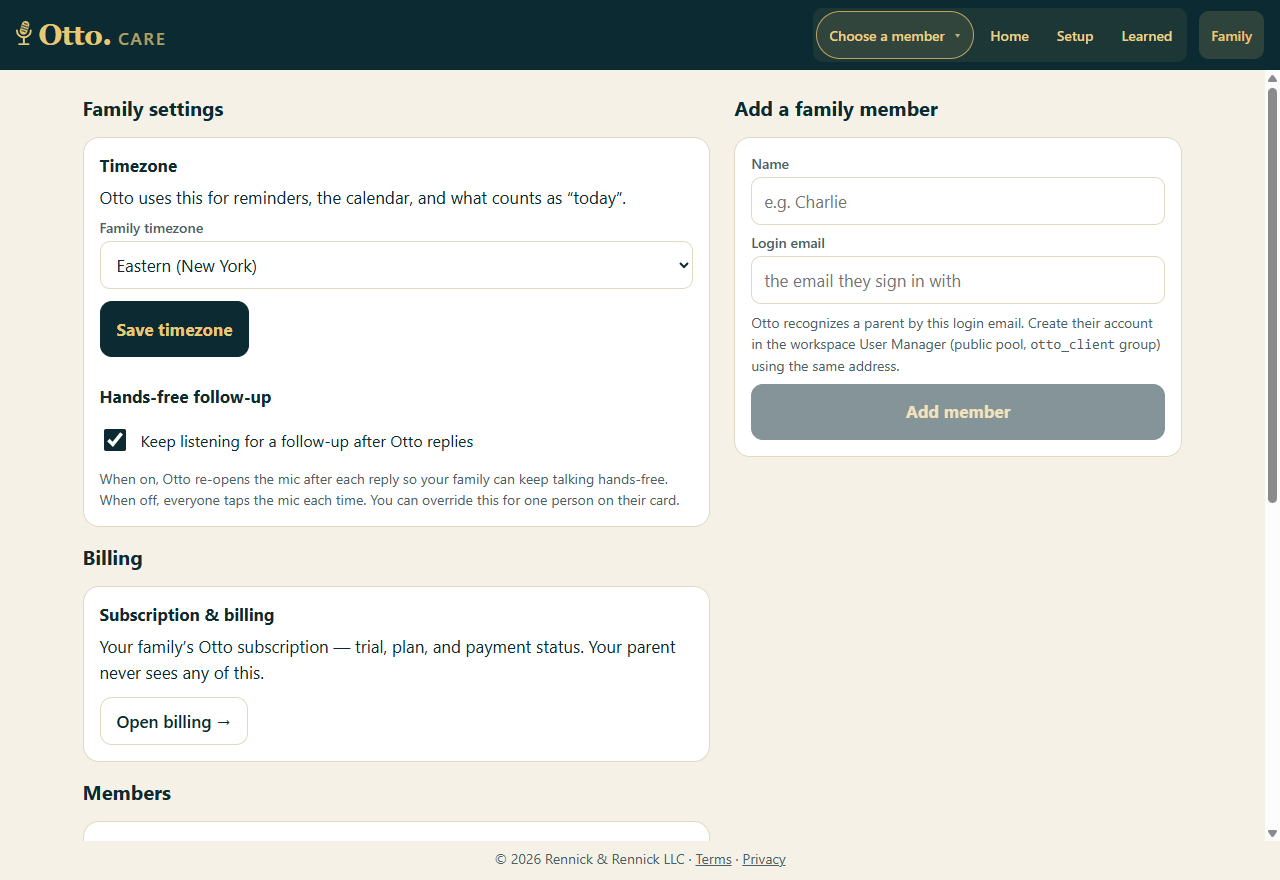
Otto.CARE family settings: time zone, hands-free follow-up toggle, billing, and add a family member
Time zone, hands-free listening, per-member voice and tone, billing — each explained in a sentence, none of it ever visible to the parent. What Otto learns in conversation waits in a review queue for the family to approve or correct.
Why it feels trustworthy

Rules the product never breaks

🎙️

Voice first, always

One big button, spoken replies, and hands-free follow-up that survives a noisy living room — the TV can't hijack the mic.

🃏

Cards are ground truth

Every fact on screen comes from real data — a real inbox, a real store, a real calendar. The AI never authors a price, a score, or a headline.

🤝

Honest about its limits

The abilities card only lists what's actually set up. Otto says “added to your cart,” never “ordered” — because checkout isn't its job.

🛡️

Safety in code, not vibes

Scam flags on email, a PII guard that refuses to store passwords or card numbers, and a ride guard for odd destinations — all deterministic.

🙋

Never a dead end

Anything Otto can't finish becomes a warm hand-off to family, with the context already gathered. “Get help” is one tap away on every screen.

👪

Families stay in charge

Each family's data is fully isolated. What Otto learns is reviewable, sensitive settings live on the family console, and the parent's own accounts stay theirs.

What Otto can do